
ISC TerraDotta (TD) Portal
ISC TerraDotta (TD) Portal
The SDSU International Student Center has switched platforms. Starting in July 2026 we are changing over to the ISC TerraDotta Portal. You should have received communication in June, and a follow up communication in July.

What is The ISC TerraDotta(TD) Portal?
Step 1: Check your SDSU email
Check your SDSU.edu for the TerraDotta invitation email with the subject line

Or, Browse to https://istudent.sdsu.edu and to log in click on the key icon.
Step 2: Verify user login & login to ISC TD Portal
Click on the key Icon to use Single Sign-On (SSO)

First time users will will be redirected to the log into your SDSU email address and password


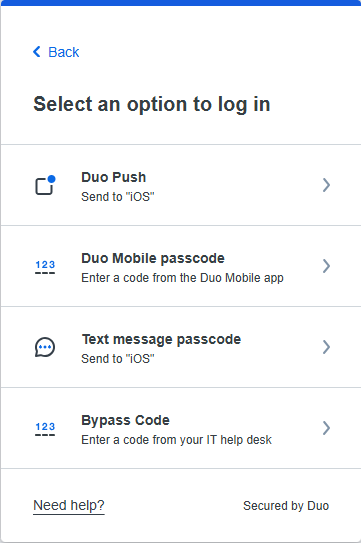
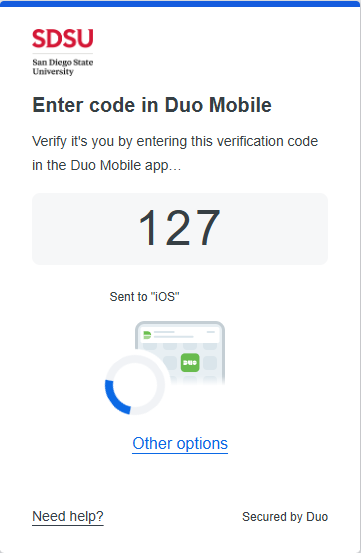
Complete the two-step authentication process using your preferred method (like DUO). You will need access to a mobile device, where a verification code will be sent to authenticate your identity. Enter the code in order to continue.
Step 3: Welcome to your ISC TD Portal Launchpad
Track your status: Check your portal regularly to see the status of your request or application.

Request Status Overview
From this page, you can monitor the progress of existing request submissions to the ISC through the Ongoing Requests, Completed Requests, and Action Required status.
You can select Review to view the details of your submission, but changes cannot be made while the request is in progress.

Ongoing Request
You can also start new requests at any time by selecting the Start New Request button. Ongoing requests will be displayed in the center of the screen within the section dedicated to active requests, this is where you can view and monitor their status.

Completed Request
The Completed Requests section displays requests that have finished processing. You can select Review to view the details and outcome of your submission. Requests in this section are read-only and cannot be edited.

Action Required
The Action Required section displays requests that need your attention before they can be processed. If additional information, documents, or corrections are required, the request will appear here. Select Start Request to review the request, make any necessary updates, and resubmit it for processing.

Step 1: Start a new request
To start a new request, select the request form name and choose the specific request type you need (e.g., Travel Signature, CPT, OPT, Program Extension, or Document Request).
Option 1: Starting a request from My Launchpad

Option 2: Starting a request from the drop down menu.

Best Practice Tip: If you do not see the request you need, use the search bar to quickly locate it. With more than 50 request options available, entering keywords such as "ARCL," "Home University," "OPT," or "Travel Signature" can help narrow the list and find the appropriate request.
Step 2: Completing the Request
All requests start with an explanation of the purpose of that specific request. Before filling out your selected request form please read the purpose to ensure you are completing the correct request and have all required documents.

Step 3: Submitting the Request
To submit please make sure to click the "Submit" button. Clicking only "Save" will keep your request as an incomplete draft and will not send it to our processing advisors nor the ISC office for processing.

Step 4: Recieving Documents
The Shared with Me section is where you can view the completed requests that are sent to you by the ISC Advisors.

In the My Documents tab, you will be able to view all documents you have uploaded for submitted requests in the All Documents section. Documents can include I-20, DS-2019, Letters, or other documents.

To log into SDSU ISC TerraDotta as a student on OPT or STEM OPT Extension:
1. Upon request of an OPT I-20, the ISC will change your login information

2. Check your personal email account for the invitation email below:

3. Enter your personal email as displayed on your I-765 application and the OPT I-20 request into the email log in section shown below:

Best Practice Tip: Use the same password or reset if needed
Staff or Faculty may be asked to provide recommendation or approval for certain request processes that will be routed through the ISC Terradotta Portal. These processes include, but may not be limited to:
- Curricular Practical Training (CPT) Recommendation
- Academic Training (AT) Recommendation
- Reduced Course Load (RCL) Recommendation
- Concurrent Enrollment Recommendation
- I-20 Extension Recommendation
When a student submits one of these requests, the designated academic advisor or approver will receive an email notification from the portal requesting approval. The email will contain a link directing you to the Terradotta Portal, where you can log in using your SDSU Single Sign-On (SSO) credentials and review the request (select the key icon shown in the image below to access SSO login). After logging in, you will be able to approve, deny, or provide any required information directly within the system.
Once you are looking at the form request information, review and either approve or deny the recommendation. The student and the ISC will be informed via the Terradotta Portal.
If you have further questions, reach out to the ISC at [email protected].
ISSS Student Directory: This guide shows users how to access the Official TerraDotta ISSS Student Knowledgebase and find information such as step-by-step instructions, troubleshooting tips, and overviews of the system's features and screens.
Document Upload Requirements: Read the request guidelines at the top of each request regarding accepted file formats (PDF, JPEG) and file size limits.
I forgot my password. What should I do?
Current and active students should always sign in using Single Sign-On (SSO) by selecting the key icon. For OPT/STEM OPT: Please contact the International Student Center Front Desk via Live Chat or email at [email protected] for assistance.
How long does processing take and how can I check the status of my submission?
7 business days for all requests upon successful submission of a correct and complete request. If more documents are requested the time does reset. Business days do not include weekends or holidays.
Will I receive email notifications?
YES. You will receive a notification from TerraDotta that your request has been completed. You will also be able to see the status of your submission on your dashboard.
If you requested a document, you will be able to see the document in your dashboard.
What browsers are supported?
They highly recommend Google Chrome, but they also support Mozilla Firefox, Apple Safari, Microsoft Edge
What devices are supported
Terra Dotta is a cloud-based software that supports any modern web browser across desktop computers, laptops, tablets, and smartphones.
Who do I contact for assistance?
Please contact us via Livechat or Email: [email protected] International Student Center Front desk
Office Hours:
Monday- Friday 9 am-4 pm. The ISC is temporarily located in the Love Library on the second floor, in room 205. You access 205 by entering the South Entrance of the Love Library.
Advising:
The office holds regularly scheduled Open Advising throughout the week. You may review the dates and times on the International Student Center Calendar.
Contact Us:
Email: [email protected] and Livechat
Former Forms & Equivalent ISC TD Requests
The processing time for ISC requests is a maximum of 7 business days. Business days are Monday - Friday. Holidays and weekends are not business days and no processing happens on these days. Plan accordingly and submit your request as early as possible. It is your responsibility to be aware of deadlines. Incomplete requests will not be processed, and your 7 business day processing time will start over once a completed request is submitted.
The forms below have been updated to reflect the TerraDotta Request.
Academic Changes
Purpose: Submit ISC TD Portal Request F-1: Change of Major on I-20 if you have changed your major and you need an updated I-20 that reflects the new major.
Processing Time: 7 business days
Purpose: Submit the ISC TD Portal Request: F-1: I-20 Extension if you will not complete your program by the program completion date listed on your I-20 and your I-20 is expiring at the end of this term. Extension of your I-20 will extend your F-1 immigration status. Note: You cannot request an extension after your I-20 has already expired. Proof of enrollment in the following semester will be required.
Required Documents:
Academic Advisor information: You will need to provide the name and email address of your academic advisor, professor, or department advisor in the request. The request will be routed to the designated advisor to review the academic need for your I-20 extension and to provide their recommendation. Once the extension is recommended, the International Student Center (ISC) will review your submission and make a final determination.
Please ensure that the contact information is entered accurately, as incorrect email addresses may result in processing delays.
- Financial Statement Form: The financial statement form must be completed, signed, and dated by the student (page 1) and the student's financial sponsor (page 2) prior to submission.
- Financial Proof: Read criteria carefully before submitting to avoid processing delays.
You must demonstrate sufficient funds to cover tuition and living expenses for the additional semester(s) indicated in your I-20 extension request.
Processing Time: 7 business days
Change of Immigration Status
ISC TD Portal Request: F-1: Completion/Termination of Immigration Status: use this request for the following reasons:
Withdrawing from the university and will not finish your degree program:
- Document needed:
- Departure itinerary or I-94 history showing you are outside the US
Important: Do not withdraw from the university without speaking with an immigration advisor at the ISC first.
Adjusting my visa status and will conclude use of my F-1 visa.
Documents Needed: (One of the following documents suffices)
- Green Card,
- New Visa,
- I-797 Approval Notice
Important: Changing or terminating status will end the use of your I-20 and all benefits associated with your F-1 Status.
ISC TD Portal Request F-1: OPT/ STEM Ending Participation Early: Use this request if you would like to withdraw from your OPT or STEM OPT participation early and do not plan to return to the USA to complete your OPT or STEM OPT period.
Documents needed:
- EAD card
- Departure itinerary or I-94 history showing you are outside the US
Actions Needed before submitting this Request:
- For OPT Students: Ensure that your SEVP portal is up to date. Your current employment should have an end date that is not in the future.
- For STEM OPT students: Submit the Final self-evaluation
Purpose: Submit the ISC TD Portal Request: Change of Status in the USA if you are currently enrolled at SDSU in a non-F1 category and will apply to change to F1 status in the U.S.
Required Action: meet or speak with an international student advisor about your e-Request prior to submitting it. Otherwise, the e-Request will not be processed.
Required Documents:
- Copy of your Current U.S. Visa
- Copy of Passport Biographic Page
- Financial Statement Form: The financial statement form must be completed, signed, and dated by the student (page 1) and the student's financial sponsor (page 2) prior to submission.
- Financial Proof: Read criteria carefully before submitting to avoid processing delays. You must demonstrate sufficient funds to cover tuition and living expenses for 1 academic year.
Processing Time: 7 business days
Purpose: Submit the F-1: Initial I-20 Establishing F-1 Status - Consular Processing or the F-1: Initial I-20 Re-Establishing F-1 Status request if you are a continuing student who needs a new SEVIS ID to be generated for one of the following reasons:
- You are currently in a non-F-1 immigration status and plan to depart the U.S. to obtain an F-1 student visa and acquire F-1 Status.
- You were in F-1 status but are now out of status and plan to re-establish legal presence in the U.S. by departing the U.S. and re-entering.
Note that a new SEVIS fee must be paid to the Student and Exchange Visitor Program. This form is not for newly admitted students requiring an I-20.
Required Action: meet or speak with an international student advisor about your e-Request prior to submitting it. Otherwise, the e-Request will not be processed.
Required Documents:
- Financial Statement Form: The financial statement form must be completed, signed, and dated by the student (page 1) and the student's financial sponsor (page 2) prior to submission.
- Financial Proof: Read criteria carefully before submitting to avoid processing delays. You must demonstrate sufficient funds to cover tuition and living expenses for 1 academic year
Processing Time: 7 business days
Departure/Leave of Absence
Purpose: Submit the ISC TD Portal Request: F-1: Leave of Absence from the U.S. if you are an international student who will take a leave of absence from SDSU and needs to take the appropriate action on their F-1 SEVIS record to depart the U.S.
Required Action: Before submitting this form, please review the ISC’s Leave of Absence webpage and make a required appointment to speak with an International Student Advisor.
Required Document:
- Departure flight information
Processing Time: 7 business days
Purpose: Submit this ISC TD Portal Request: F-1: Return from Leave of Absence I-20 if you are currently on a leave of absence and would like to return to SDSU to resume your degree program. For information on returning from a Leave of Absence, please review the ISC’s Leave of Absence webpage.
Required Documents:
- Screenshot of your My.SDSU record showing that all holds have been removed for the semester in which you will return OR a screenshot showing your enrollment in classes for the semester in which you will return.
- Financial Statement Form: The financial statement form must be completed, signed, and dated by the student (page 1) and the student's financial sponsor (page 2) prior to submission.
- Financial Proof: Read criteria carefully before submitting to avoid processing delays. You must demonstrate sufficient funds to cover tuition and living expenses for 1 academic year
Processing Time: 7 business days
Purpose: Submit the ISC TD Portal Request: F-1: Transfer Out to either transfer your SEVIS record to another U.S. school OR if you need a transfer clearance form to be completed.
Required Action: Only students who will not complete their degree program at SDSU and are transferring out are required to speak with an ISC advisor. To make an appointment, please contact us.
Required Documents: Vary depending on type of request:
- For SEVIS Transfer Out Request:
- Upload a copy of acceptance letter to new institution
- Provide New School SEVIS number
- For Transfer Clearance Form:
- New School’s transfer out clearance form.
Please note, that if you submit your SEVIS transfer request after departing the US during your 60 grace period following program completion or OPT, it will not be possible to process your request.
Processing Time: 7 business days
F-1 Student Employment
- ISC TD Portal Request:F-1: CPT Authorization
- ISC TD Portal Request: F-1: Edit Current CPT Employment Authorization
- ISC TD Portal Request: F-1: Cancel CPT Employment Authorization
Purpose: Submit these Portal Request above to upload your CPT application along with required documents to seek permission to engage in Curricular Practical Training (CPT). Students are only allowed to start working AFTER they receive the I-20 with CPT authorization and can only work during the approved CPT dates indicated on I-20. Visit the ISC’s CPT webpage for more information.
-
Information:
You will need to provide the name and email address of your academic advisor, professor, or department advisor in the request. The request will be routed to the designated advisor to review the academic need for CPT and provide their recommendation. Once the CPT is recommended, the International Student Center (ISC) will review your submission and make a final determination.
Please ensure that the contact information is entered accurately, as incorrect email addresses may result in processing delays. - Employment/Internship Offer Letter: The letter needs to be on company letterhead and include:
- your name,
- company name,
- complete address of company,
- the anticipated start and end dates of employment,
- the number of hours per week,
- if the position is paid or unpaid,
- your job title,
- a brief description of the duties.
- signed and dated by your employer.
- supervisory plan for remote work (if applicable)
ISC TD Portal Request: F-1: OPT I-20
Processing Time: 7 business days
Purpose: Submit the ISC TD Portal Request: F-1: OPT I-20 to request an I-20 with OPT recommendation if you are completing your degree program and will be applying for pre-completion or post-completion OPT application within 30 days. Before submitting this request, review the ISC’s OPT webpage.
Required Documents:
- Upload receipt for the $100 International Student Optional Practical Training Administrative Processing Fee. You may pay this fee at https://commerce.cashnet.com/ECASHIER
Processing Time: 7 business days
Purpose: Submit ISC TD Portal Request: F-1 STEM OPT Extension I-20 if you are currently on post-completion OPT and are requesting an I-20 with recommendation to apply for OPT STEM extension. Before submitting this request, review the ISC’s OPT STEM 24 month Extension webpage.
Required Documents:
- Upload receipt for the $200 International Student STEM Optional Practical Training Administrative Processing Fee. You may pay this fee at https://commerce.cashnet.com/ECASHIER
- I-983 training plan.
Processing Time: 7 business days
- ISC TD Portal Request: F-1: OPT Add New Employer
- ISC TD Portal Request: F-1: Edit Current OPT Employer
- ISC TD Portal Request:F-1: Cancel OPT Request
- ISC TD Portal Request:F-1: Delete OPT Employer
- ISC TD Portal Request: F-1: OPT/STEM OPT - I-20 Reprint
- ISC TD Portal Request: F-1: OPT/STEM OPT SEVP Portal Reset
- ISC TD Portal Request F-1: OPT/ STEM Ending Participation Early
- ISC TD Portal Request: F-1: OPT/STEM OPT - Update Student Address, Email, Phone
Purpose: Use the Request forms listed above if you are a student on OPT or OPT STEM extension and one of the following applies:
- You have not received your SEVP portal email notification after the start date on your EAD card
- Portal Reset Request: Your SEVP portal account is locked
- Personal information has changed:
- Email address
- U.S. physical address
- Phone number
- You are ending Post-Completion OPT early and departing the U.S., or changing to another immigration status
- You are updating employment information past the 10-day reporting window
- OPT I-20 Updated Reprint:
- Your OPT status changed from "Pending" to "Approved
- You self-reported your employment in SEVP and would like a reprinted I-20 to reflect the updated information
- Received H1B Cap Gap extension and would like a reprint of your I-20 to reflect this information
Processing Time: 7 business days
- ISC TD Portal Request: F-1: STEM OPT - Add New Employer
- ISC TD Portal Request:F-1: STEM OPT - Update Current Employer
- ISC TD Portal Request :F-1: Delete STEM OPT Employer
- ISC TD Portal Request: F-1: OPT/STEM OPT - I-20 Reprint
- ISC TD Portal Request: F-1: OPT/STEM OPT SEVP Portal Reset
- ISC TD Portal Request F-1: OPT/ STEM Ending Participation Early
- ISC TD Portal Request :F-1: OPT/STEM OPT - Update Student Address, Email, Phone
Purpose: Use the request forms listed above if you are a student on STEM OPT Extension and one of the following applies:
- Personal information has changed (email address, U.S. physical address, phone number)
- Change /update employment information
- Updated I-983 with material changes.
- Received H1B Cap Gap extension and would like a reprint of your I-20 to reflect this information.
- STEM OPT I-20 Reprint - status updated to approved
- SEVP Portal Password Reset
Required Documents:
- Updated I-983 form for material changes related requests.
Processing Time: 7 business days
Purpose: Use the ISC TD Portal Request: F-1: STEM OPT Validation and Self-Evaluation Report if you are a student on STEM OPT Extension and one of the following applies:
- Report their 6-month Validation
- Report their 12-month Validation and annual evaluation
- Report their 18-month Validation
- Report their 24-month Validation and annual evaluation
Required Documents:
- 12-month annual evaluation - Upload the completed top portion of page 5 of the I-983 Form.
- 24- month Final evaluation - Upload the completed bottom portion of page 5 of the I-983 Form.
Processing Time: 7 business days
Purpose: Submit the ISC TD Portal Request: Social Security Verification if you are an F-1 student who has been offered on campus employment and need a letter from the ISC certifying your F-1 status to apply for a Social Security Number (SSN). Please review the detailed information about how to apply for a Social Security number.
Required Documents:
- Letter from HR of Evidence of On-Campus Employment
Before Submitting Ensure you have done the following:
- Completion of the New Student F-1 Immigration Module
- Purchase of Health Insurance
Processing Time: 7 business days
F-1 I-20 Travel Signature/Replacement/Update
Purpose: Submit the ISC TD Portal Request: I-20 Travel Signature/Update/Replacement to request a travel signature or a replacement I-20, only for the reasons listed below:
- Lost
- Damaged
- Travel Signature
Processing Time: 7 business days
- ISC TD Portal Request: F-1: Add Dependent
- ISC TD Portal Request: F-1: Update Country of Citizenship
- ISC TD Portal Request: F-1: Change of Name
- ISC TD Portal Request: F-1 Update Financial Documentation
Purpose: Submit these request above to request one of the I-20 updates listed below.
- Add Dependent
- Change of Country of Citizenship
- Change of Name
- Update Financial Documentation
Required Documents:
- Add Dependent
- Passport Copy of Dependent(s)
- Copy of Financial Documentation
- Copy of Marriage Certificate (spouse dependent) or Birth Certificate (child dependent) with English translation
- Change of Country of Citizenship
- Copy of New Passport
- Change of Name
- Copy of New Passport
- Update Financial Documentation
- Financial Statement Form: The financial statement form must be completed, signed, and dated by the student (page 1) and the student's financial sponsor (page 2) prior to submission.
- Financial Proof: Read criteria carefully before submitting to avoid processing delays. You must demonstrate sufficient funds to cover tuition and living expenses for 1 academic year
Processing Time: 7 business days
Financial Statement Forms
Purpose: use this F-1 financial statement form if you are a continuing degree-seeking student and need to provide evidence of funding.
Required Documents:
Purpose: use this J-1 Financial Statement form if you are a J-1 exchange student and need to provide evidence of funding.
Required Documents:
Health Insurance
Purpose: Submit the ISC TD Portal Request: Health Insurance Compliance to complete this requirement.
Please note that the removal of the health insurance hold may take up to two business days (excluding weekends and holidays) after your insurance request has been reviewed.
Federal and State law, the California State University (CSU) system, and SDSU require international students to maintain adequate health insurance coverage throughout the duration of their academic program. All matriculated international students in F-1 or J-1 visa status are required to purchase the preapproved provided International Student Health Insurance Plan.
Full-Time Enrollment
Purpose: Submit the ISC TD Portal Request: F-1: Reduced Course Load Authorization to upload your application for a reduced course load by Friday of the second week of classes.
Required Action: Before completing this request form, please read the Application for Reduced Course Load (ARCL) information for eligibility.
Required Documents:
- You will need to provide the name and email address of your academic advisor, professor, or department advisor in the request. The request will be routed to the designated advisor to review the academic need for Reduce Course Load (RCL) and provide their recommendation. Once the RCL is recommended, the International Student Center (ISC) will review your submission and make a final determination.
Please ensure that the contact information is entered accurately, as incorrect email addresses may result in processing delays. - Other required documents, when applicable.
Processing Time: 7 business days
Purpose: Submit the ISC TD Portal Request: F-1 Concurrent Enrollment only if you will be under-enrolled at SDSU (less than 12 units for undergraduate and less than 9 units for graduate students).
If you will be enrolled full-time at SDSU, you do not need to complete this form. For Concurrent Enrollment rules and application steps, please review this webpage first.
- Academic Advisor Information Needed: You will need to provide the name and email address of your academic advisor, professor, or department advisor in the request. The request will be routed to the designated advisor to review the academic need for Concurrent Enrollment and provide their recommendation. Once the Concurrent Enrollment is recommended, the International Student Center (ISC) will review your submission and make a final determination.
Please ensure that the contact information is entered accurately, as incorrect email addresses may result in processing delays.
Processing Time: 7 business days
J-1 Exchange Students
Purpose: Submit the ISC TD Portal Request: J-1: DS-2019 Travel Signature/Update/ Replacement if you hold J-1 immigration status and need a travel signature, replacement or updated DS-2019 for the reasons listed below:
- Travel signature
- Lost
- Damaged
- Updated
Processing Time: 7 business days
Purpose: Submit the ISC TD Portal Request: J-1: Exchange Student Home University Forms Submission if you are a J-1 exchange student and need to request a signature for a home university form--such as a learning agreement or Arrival/Departure form--required by your home university.
Important to Note before submitting:
- For Arrival/Departure Documents:
- Arrival forms will not be signed until after you have attended International Student Check In and Reception, and completed the J-1 Immigration Online Module.
- Departure forms will not be signed until after the program end date shown on your DS-2019.
- For Learning Agreement: You may submit this form once your schedule at SDSU has been finalized.
- Learning Agreements won't be signed until AFTER the schedule adjustment (add/drop) deadline so please submit after that date.
- If you make any changes to your schedule, it is your responsibility to submit an updated request.
Processing Time: 7 business days
Purpose: Submit the ISC TD Portal Request: J-1: Exchange Student Semester Extension if you are a J-1 exchange student who is studying at SDSU for one semester and wish to extend for one more semester. Submission of this request starts the process of receiving approval from both your home university coordinator and the SDSU Global Education Office. For more details read the “EXTENSION OF PROGRAM” information under the “Current J-1 Students” section in the J-1 Exchange Students site.
Required Documents:
- J-1 Financial Statement Form & Financial Proof: You must demonstrate sufficient funds to cover living expenses for the additional semester added to your DS-2019.
Deadline to request:
- Extending from Fall to Spring: November 1st
- Extending from Spring to Fall: April 1st
Processing Time: If approval from your home University and SDSU’s Global Education Office is granted, please allow an additional 7 business days for the International Student Center to issue you an updated DS-2019.
J-1 Student Employment
Purpose: Submit the ISC TD Portal Request: J-1: On Campus Employment Authorization to request and receive authorization to work on-campus as a J-1 student. Authorization from the ISC must be received before J-1 students can begin working. J-1 students who have more than one on-campus job or change campus jobs must submit a new request for each job. You may work up to 20 hours per week on campus while school is in session.
Required Documents:
- Letter from HR of Evidence of On-Campus Employment
Before Submitting Ensure you have done the following:
- Completion of the New Student J-1 Online Orientation
- Purchase of Health Insurance
Processing Time: 7 business days
Purpose: Submit the ISC TD Portal Request: J-1 Academic Training Authorization to upload your J-1 Academic Training application along with required documents to seek permission to engage in Academic Training (AT). Before Submitting review the application steps in the “J-1 Off-Campus Employment: Academic Training” section of the J-1 Employment page.
- Academic Advisor Information Needed: You will need to provide the name and email address of your academic advisor, professor, or department advisor in the request. The request will be routed to the designated advisor to review the academic need for the Academic Training and provide their recommendation. Once the Academic Training is recommended, the International Student Center (ISC) will review your submission and make a final determination.
Please ensure that the contact information is entered accurately, as incorrect email addresses may result in processing delays.
Required Documents:
- Employment/Internship Offer Letter: The letter needs to be on company letterhead and include:
- your name,
- company name,
- complete address of company,
- the anticipated start and end dates of employment,
- the number of hours per week,
- if the position is paid or unpaid,
- your job title,
- a brief description of the duties.
- signed and dated by your employer.
- supervisory plan for remote work (if applicable)
- Additional financial support documents may be needed based on your request.
Processing Time: 7 business days
Purpose: Submit the ISC TD Portal Request: J-1 Academic Training Reporting Form if you are a J-1 student currently on Academic Training and need to do one of the following:
- Report a change of US address, phone number, or email address;
- Ending your Academic Training early
- Submitting the end of Academic Training Evaluation.
Processing Time: 7 business days
Letter Request
Purpose: Submit the ISC TD Portal Request: F-1: Letter to request Authorization to Take Additional Courses Outside of SDSU. This letter is often required by the school outside of SDSU that you are requesting to take classes in. The letter certifies that the ISC authorizes you to take classes at another school.
Reminders:
- You must be enrolled at SDSU full time (Bachelors = 12 units, Masters= 9 units, Doctorate= 6 units)
- It is the student’s responsibility to ensure that their class selections outside of SDSU are transferable to SDSU and applicable towards their Degree.
Please Note: If you are fully sponsored by the Ministry of Education of your country, such as SACM, KCO, Qatar, and UAE, please go to the Sponsored Student webpage and complete the appropriate form.
Processing Time: 7 business days
Purpose: Submit the ISC TD Portal Request: F-1: Letter if you need a letter that certifies you are an F-1 or J-1 student attending SDSU. Your date of birth, citizenship, major, and the number of units currently enrolled in will be included. Note: No alterations will be made to the standard format of this letter.
Processing Time: 7 business days
Purpose: Submit the ISC TD Portal Request: F-1: Letter if you need a letter other than the ones above, please provide a detailed description of what you need. Your request will be reviewed and evaluated to determine if the International Student Center can assist.
Processing Time: 7 business days If you need a letter
Sponsored Students
If you are fully sponsored by the Ministry of Education of your country, such as SACM, KCO, Qatar, and UAE, please go to the Sponsored Student webpage and complete the appropriate form